
The short answer: four to eight cameras on the ways in, recording on backup power
Most houses start with four to eight cameras: one at the gate that can show a face, and the rest on the driveway, the front door, each side of the house, and the back yard if there’s a way in from there.
What matters more than the number is what each camera lets you see and play back afterwards. A camera that records a clear face at the gate, day and night, and keeps recording through a power cut, is worth more than three that show the tops of heads.
Want them fitted? See our CCTV and security camera installation service, or WhatsApp us a few photos of your house.
On this page:
- How many cameras a house needs
- Where to put security cameras
- Where not to put them
- Do they need Wi-Fi?
- Night vision
- Recording and watching on your phone
- Power cuts
How many cameras a house needs: count the ways in, not the rooms
Walk round the outside and list every place someone could come in, or carry something out. Each one needs a camera that shows it clearly. This is where they usually go on a house:
| Spot | What the camera must show | How we set it up |
|---|---|---|
| The gate | A face, and the car coming in | Low enough and zoomed in enough to see a face, not the top of a head |
| The driveway | People and cars moving towards the house | Colour at night, so you can tell one car from another |
| The front door | Who is standing at the door | Face on, under cover from the rain |
| Each side of the house | Anyone walking down the side | Looking along the wall, so the whole run is in view |
| The back yard and back wall | Someone coming over the wall | Covering the wall line, alongside the electric fence and alarm |
| Garages and outbuildings | Who goes in and out | A camera on the door |
Recorders come in 4, 8 and 16 channels. Buy one with spare channels and a house can start with four cameras and add more later. At a Meyersdal home the 8-channel recorder was full, so we moved it to 16 channels and added ten colour cameras.
Where to put security cameras: low enough for faces, out of the sun
- Height. Mount each camera out of easy reach, but no higher than it needs to be. Too high, and you record caps and the tops of heads.
- Lens width. A wide lens shows the whole yard, but a face at the far end is a few blurry pixels. Use a narrower view at the gate and the door, where you need to recognise someone.
- Light. A lens facing the morning or evening sun shows a silhouette for part of the day. We angle cameras across the light, not into it.
- Clear space in front. At night, a camera’s infrared light bounces off a nearby eave or a pale wall and washes out the picture.
- Overlap. Where you can, let cameras see each other’s areas, so if one is knocked or covered, another still has the picture.
We show you what each camera will see before we drill, so there are no surprises when you play the footage back.

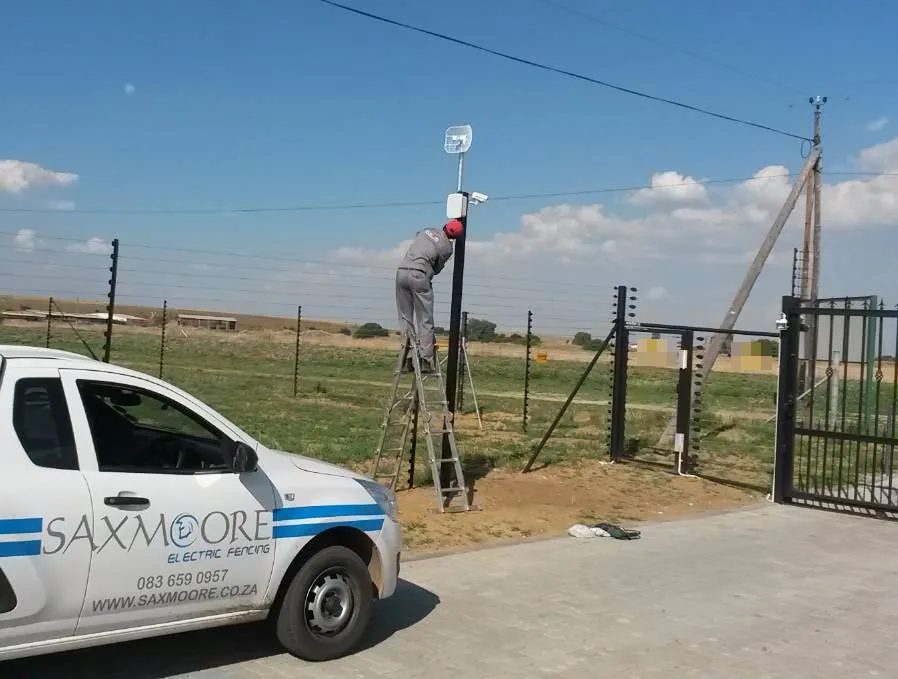
Our job: fitting a camera to a pole beside an electric fence.
Where not to put security cameras, and why
- Facing straight into the rising or setting sun.
- Right under an eave or close to a pale wall, where the night light bounces back into the lens.
- Low enough at the gate to be grabbed, turned or sprayed over.
- Pointing into your neighbour’s yard, windows or pool. Footage of people who can be identified is personal information under POPIA, so keep cameras on your own property.
- In bedrooms and bathrooms, or anywhere family, staff or guests would expect privacy.
This is practical guidance, not legal advice. For a complex or estate, the body corporate or HOA should have its own camera policy.
See how we install CCTV for homes, or WhatsApp us photos of your house
Do home security cameras need Wi-Fi? Not to record
Wired cameras send their picture down a cable to a recorder in the house, and the recorder keeps the footage whether or not the internet is up. The internet only matters when you want to watch from your phone while you’re out, over Wi-Fi, fibre or a SIM card.
Wi-Fi cameras send their picture over your home Wi-Fi instead. They still need power at each camera, and if the signal fades through a wall or the router goes off in a power cut, the camera loses its link to wherever it records.
| Wired to a recorder | Wi-Fi cameras | Solar 4G cameras | |
|---|---|---|---|
| Where it records | A hard drive in the recorder, with or without internet | A recorder, the cloud or a memory card, over your Wi-Fi | Over the mobile network, on its own SIM card |
| Power | Through the cable from the recorder, or a power supply | A plug or a battery at each camera | Its own solar panel and battery |
| In a power cut | Keeps recording if the recorder has backup power | Drops off when the router loses power | Carries on, on its own battery |
| Suits | Gates, driveways, walls and doors | A room or two inside | Gates and boundaries with no power or Wi-Fi |
On most houses we fit wired Hikvision cameras, so the footage doesn’t depend on the Wi-Fi. For spots with no power at all, see solar CCTV cameras.
At night, colour cameras show you clothes and cars, not just shapes
Most cameras switch to black-and-white infrared after dark. That shows movement, but it’s hard to tell a red car from a blue one, or describe a jacket.
Colour-at-night cameras, like Hikvision’s ColorVu range, use a very sensitive sensor and a soft white light to keep recording in colour. We put them on gates and driveways, as on the Meyersdal home with its ten colour cameras. More on the options in types of CCTV cameras.
Recording: the hard drive decides how far back you can look
The cameras record to a hard drive in the recorder. When it’s full, the recorder writes over the oldest footage, so the size of the drive decides how many days you can go back.
- More cameras and a higher resolution fill the drive faster.
- Ask yourself how long it could take to notice something missing, and keep at least that many days on the drive.
- If something happens, save the clip that day, before it’s written over.
- Put the recorder out of sight, in a locked cupboard with some airflow. If it sits next to the TV, a burglar can take the footage with the TV.
Which recorder you have changes the cabling and the upgrade options; see DVR or NVR.
Watching on your phone: live view and playback from anywhere
Hikvision systems run on the Hik-Connect app. You watch the cameras live, scroll back through the recording, and save clips to your phone, and each person in the family can have their own login.
We set the app up on your phone before we leave. If it ever disappears after a new router or a new phone, our Hik-Connect guide shows how to add the recorder again.
See how we install CCTV for homes, or WhatsApp us photos of your house
Power cuts: cameras only record if the recorder has backup power
Without backup power, the cameras and the recorder go dark the moment the power goes off, and there’s no footage of whatever happens in the dark.
A UPS or battery keeps the recorder recording. Where the cameras draw their power from the recorder, the same backup keeps them running too. How long it lasts depends on the battery and how many cameras it runs.
To watch from your phone during a power cut, the router needs backup as well. Solar 4G cameras carry their own battery, so they keep going regardless.
How we plan the cameras for a house
- You WhatsApp us photos of the gate, the driveway, the walls and the doors, with your suburb.
- We mark where each camera goes and what it will see, and show you before we drill.
- You get an itemised quote listing the cameras, the recorder, the hard drive, the backup power and the cabling.
- We install it, set up the app on your phone, and show you how to find and save footage.
We install Hikvision cameras as standard, and the same team fits electric fences, alarms and gate motors, so when the alarm goes off, the cameras show you what set it off. For what moves the price, see CCTV installation cost.
See how we install CCTV for homes, or WhatsApp us photos of your house
Send us photos of your house, and we’ll plan the cameras
WhatsApp photos of the gate, the driveway and the walls, or call 083 659 0957. We install home security cameras across Johannesburg, Pretoria and Centurion, the East Rand and the Midvaal.
Questions people ask
How many security cameras does a house need?
Most houses start with four to eight: one at the gate that can show a face, plus the driveway, the front door, each side of the house and the back yard if there’s a way in. Count the ways in, not the rooms.
Where should home security cameras go?
On the ways in: the gate, the driveway, the front door and each side of the house. Mount them out of easy reach but low enough to see faces, and angle them across the sun rather than into it.
Where should you not put a security camera?
Facing into the sun, right under an eave or beside a pale wall that bounces the night light back, within easy reach at the gate, or pointing into a neighbour’s yard or windows.
Do home security cameras need Wi-Fi to work?
Not to record. Wired cameras record to the recorder in your house without the internet. Wi-Fi, fibre or a SIM card is only needed to watch them on your phone while you’re out.
Can CCTV record when the power is off?
Only with backup power. A UPS or battery keeps the recorder, and any cameras powered from it, recording through a power cut. A solar 4G camera has a battery of its own.
How long does CCTV keep footage?
Until the hard drive is full; then the recorder writes over the oldest recording. The drive size, the number of cameras and the resolution decide how many days that is, so we size the drive for how far back you want to look.
Can I point a camera at my neighbour’s house?
Keep cameras on your own property. Footage of people who can be identified is personal information under POPIA, and a camera looking into a neighbour’s yard or windows invites a dispute. This is general guidance, not legal advice.
Can I watch my home cameras on my phone?
Yes. Hikvision systems use the Hik-Connect app for live view and playback, which needs an internet connection at the house. We set it up on your phone before we leave.